DokAudit for Drupal
Accessible PDFs directly in Drupal. Media, file fields and links stay exactly as they are.
The DokAudit module checks the PDFs in your Drupal media library against PDF/UA-1, WCAG 2.2 and BITV 2.0 (Germany’s federal accessibility ordinance for IT, based on EN 301 549) and replaces them with the remediated version. The file ID (fid) and URI stay the same. Media, file fields and links in text keep working.
- Drupal 10.3 and 11
- Original backed up, restore with one click
- Licence GPL-2.0-or-later
- 20 trial credits = 100 pages
Try it free · View the live demo · Book a call
What the module does
The module connects your Drupal website to DokAudit. It finds the PDFs in the media library, hands them over for checking and remediation and then swaps them.
- Checks against PDF/UA-1, WCAG 2.2 and BITV 2.0: DokAudit checks every PDF, repairs it and then checks it again. In the overview you see the score before and after, the seals achieved (PDF/UA-1, WCAG 2.2, PDF/A-2a) and the link to the test report in the DokAudit hub.
- Replaced in place: The remediated version replaces the file without creating a new file entity. fid and URI stay the same. You do not need to touch media, file fields or links in text.
- Original backed up: Before replacing a file, the module stores the original under public://_dokaudit_backup/. “Restore original” puts it back with one click.
- Replaced only if it improves: The file is only swapped if the score rises by at least the configured minimum gain (default: 1 point). Otherwise the original stays online.
- New PDFs queued automatically: Newly uploaded or replaced PDFs are picked up in the next sync. If a file is uploaded again while it is being processed, the module discards the result and checks the new version.
- “Check only” mode: In “check only” mode the module replaces nothing. You first see where your PDFs stand and switch on replacement later.
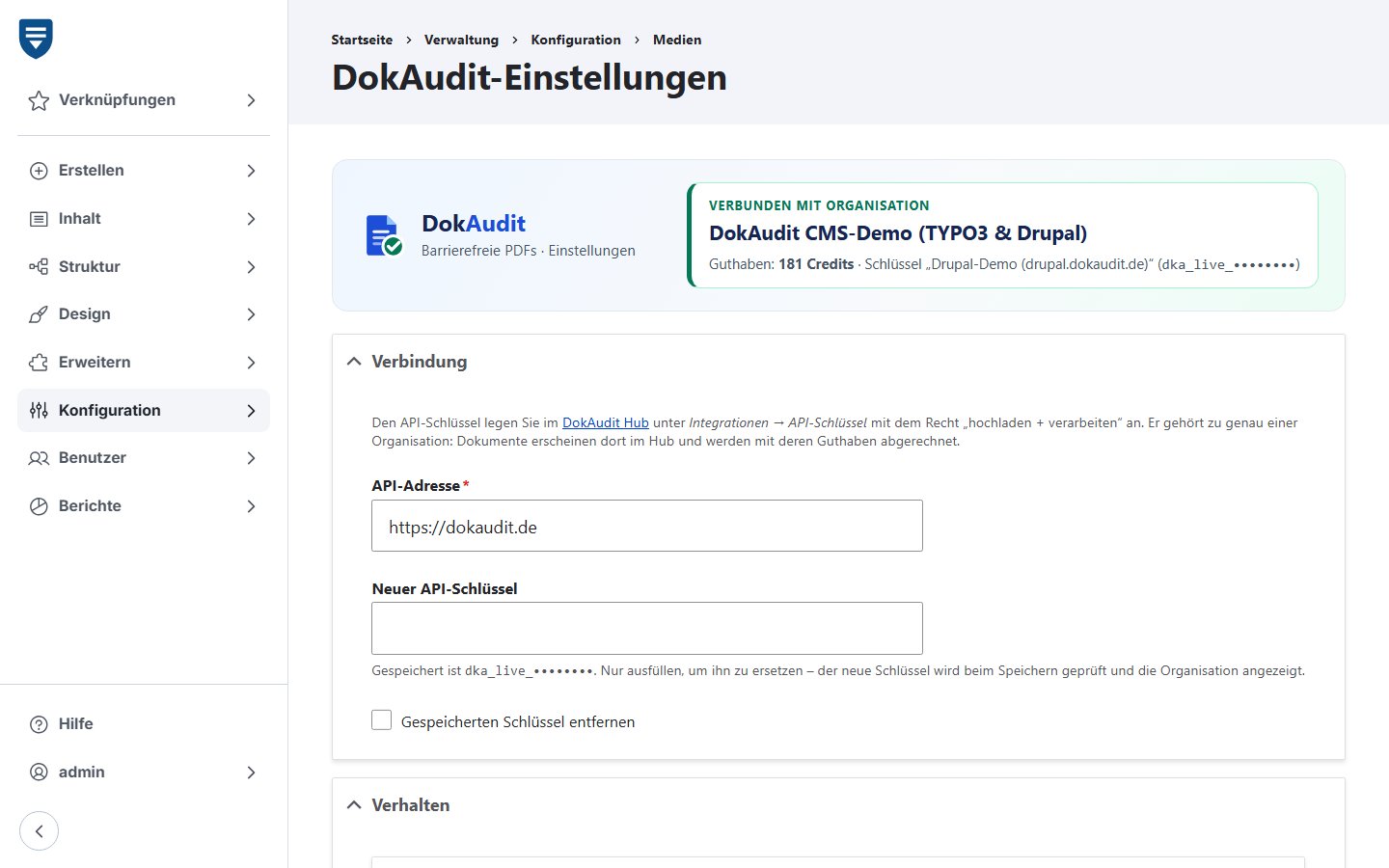
Settings under Configuration → Media → DokAudit
The header shows organisation, credit balance and key at a glance. A new key is verified when you save it, and the organisation it belongs to is displayed.
Without an entry in the settings, the environment variable DOKAUDIT_API_KEY applies. A saved key takes precedence. You also define:
- Mode: check and replace, or check only
- Folders: include only certain folders, for example formulare/ and satzungen/, or exclude folders
- Minimum gain: replace only from this improvement upwards (default 1)
- Uploads per cron run: default 10; the cron sync can be switched off
- Backup folder and an upper limit for large PDFs (default 50 MB)
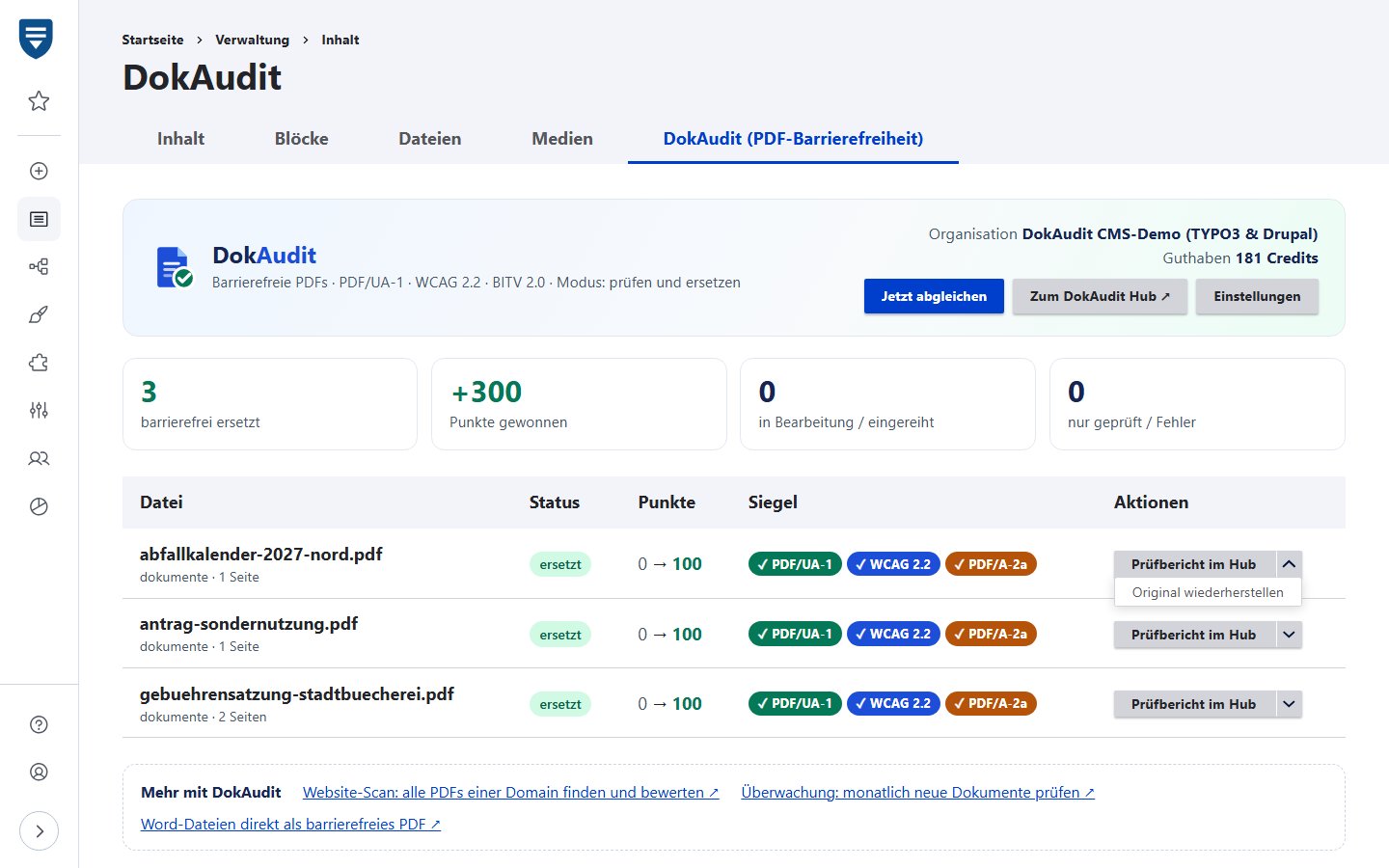
The overview under Content → DokAudit
The overview at /admin/content/dokaudit is available to all accounts with the permission “Administer DokAudit” (DokAudit verwalten). It fetches finished results as soon as you open it. Its interface is currently in German.
- Overview: Connection and credit balance, key figures and the list of all registered PDFs with score before and after.
- Actions: “Sync now” (Jetzt abgleichen) for all files, and “Restore original” (Original wiederherstellen) and “Check again” (Erneut prüfen) for each file.
- Seals and test report: For each document, the seals achieved and a link to the test report in the DokAudit hub, as evidence for your records.
- Notices: The overview points out PDFs that have not yet been checked and warns when credits are running low.
- Update notice: When a newer version of the module is available, the notice appears in the overview and in Drupal’s status report.
- Drush: drush dokaudit:sync syncs the files, and drush dokaudit:restore with the file ID restores an original.
Set up in three steps
Once installed, setting it up takes a few minutes.
- Create an API key: In the DokAudit hub, go to Integrations → API keys and create a key with write permission. The key belongs to your organisation: documents appear in its hub and are billed to its credit balance.
- Enter the key in Drupal: Under Configuration → Media → DokAudit, enter the API address and key and save.
- Cron does the rest: The sync runs with every cron run. You can also start it at any time with “Sync now” or via Drush.
Installation and requirements
Standard route – ZIP download: Download the current version as a ZIP, unpack it to web/modules/custom/ (folder dokaudit) and enable the module, for example with drush en dokaudit -y. Enabling the module creates the table dokaudit_file.
Composer variant: Unpack the ZIP into a folder of your project outside web/modules/custom/ and add it as a path repository: composer config repositories.dokaudit '{"type":"path","url":"path/to/dokaudit"}', then composer require dokaudit/drupal-dokaudit:@dev and drush en dokaudit -y.
Updates: replace the folder, then run drush updatedb. The module itself tells you when a new version is available.
- Drupal 10.3 or 11
- PHP 8.1 or later
- Drush 12 or 13 for the console commands
- A DokAudit account with an API key
DokAudit for TYPO3 · REST API and other integrations
Costs, licence and data protection
- Billed via your credits: The module itself is free of charge. DokAudit bills checking and remediation just as in the hub: 1 credit per 5 pages or part thereof, from €0.50 per page in the public sector plan, AI included. See pricing
- GPL licence: The module is licensed under GPL-2.0-or-later. You can inspect and adapt the source code.
- Data protection: Only the PDF files are transferred, encrypted via HTTPS. Processing takes place in an ISO/IEC 27001-certified data centre in Germany under your organisation’s data processing agreement.
- Your own instance: The API address is configurable. If you run DokAudit in your own data centre, connect the module to your instance.
Frequently asked questions
- What happens to links to the PDFs?
- Nothing. The file ID (fid) and URI stay the same; only the content of the file is swapped. Media, file fields and links in text keep pointing to the same file.
- What if the remediated version is worse than the original?
- Then nothing is replaced. The module only swaps a file if the score rises by at least the configured minimum gain. Once a file has been replaced, the original sits in the backup folder and can be restored with one click.
- Are files transferred to third parties?
- The module only transfers the PDF files themselves, encrypted via HTTPS to DokAudit. They are processed in an ISO/IEC 27001-certified data centre in Germany under your organisation’s data processing agreement. For AI tasks, DokAudit uses a provider named as a sub-processor in the data processing agreement (in German). AI can be restricted to providers in the EU or switched off.
- Does the module run on Drupal 10?
- Yes, from Drupal 10.3. Drupal 10.3 and 11 are supported with PHP 8.1 or later. Drupal 9 is not supported.
- Do I need Composer or Drush?
- No. The standard route is the ZIP download: unpack it to web/modules/custom/ and enable the module. If your project uses Composer, you can also add the unpacked folder as a path repository and install the module with composer require dokaudit/drupal-dokaudit:@dev. The sync runs via cron and the buttons in the overview. You only need Drush 12 or 13 for the console commands.
- What does it cost?
- The module is free of charge and licensed under the GPL. Checking and remediation use credits just as in the hub: 1 credit per 5 pages or part thereof, from €0.50 per page in the public sector plan. When you register, you receive 20 credits for testing, which is 100 pages. If the balance is insufficient, the file waits until credits are available again.
- Can I check first without replacing anything?
- Yes. In “check only” mode you see scores and test reports while the files stay unchanged. You can also restrict the sync to individual folders.
Make the PDFs in Drupal accessible
Register, create an API key and enter it in Drupal. 20 trial credits for 100 pages are free. We are happy to answer questions about your installation in a call.
Try it free · View the live demo · Book a call