API and integration
Accessible PDFs straight from your systems
The DokAudit REST API builds checking and correction into your content management system, DMS or form server: hand over a document, receive the result by webhook, collect the corrected version and the evidence. It is the same document library as in the hub – whatever the API uploads, you see there too.
- REST API + webhooks + remote MCP
- TYPO3 12.4/13.4 · Drupal 10.3/11
- On-premises with Docker
Open the API documentation · Try it free (20 credits)
The key endpoints
Base URL https://dokaudit.de/api/v1, authentication via the header Authorization: Bearer dka_live_…. The complete, machine-readable description (OpenAPI) is available at /api/v1/openapi.json.
Endpoints of the DokAudit API| Method and path | Purpose |
|---|
| POST /documents | Upload a document (PDF or Word) and start processing |
|---|
| GET /documents | List and filter the documents in the library |
|---|
| GET /documents/{id} | Query the status (uploaded, queued, processing, checked, fixed, waiting_credits, error) |
|---|
| GET /documents/{id}/report | Test report as JSON |
|---|
| GET /documents/{id}/files/{kind} | Download the original, the corrected version (PDF/UA-1), the PDF/UA-2 version or the report as PDF |
|---|
| POST /documents/{id}/process | Process again |
|---|
| DELETE /documents/{id} | Delete a document |
|---|
| POST /webscans | Search a website or a list of URLs for PDFs and run a free quick check |
|---|
| POST /webscans/{id}/import | Import the PDFs found into the library and correct them automatically |
|---|
| GET /monitors | List recurring website monitors |
|---|
| POST /monitors | Set up daily, weekly or monthly monitoring |
|---|
| POST /monitors/{id}/run | Run a monitor immediately |
|---|
| GET /account | Organisation and credit balance |
|---|
Example call with curl:
curl -H "Authorization: Bearer $DOKAUDIT_KEY" -F file=@report.pdf -F auto_mode=true https://dokaudit.de/api/v1/documents
DokAudit as a tool for AI agents.
Remote MCP
The MCP endpoint provides the hub, the website scan and Continuous Accessibility as standardised agent tools. It uses the same API keys, tenants and permissions as the REST API – no second permission model.
- Server: https://dokaudit.de/mcp/
- Auth: Bearer dka_live_…
- Transport: MCP Streamable HTTP
Example tasks for agents
- “Show me all documents that still need attention.”
- “Scan this website for PDFs that are not accessible.”
- “Set up weekly monitoring.”
- “What has changed since the last scan?”
Writing MCP tools require an API key with write permission. Auto-remediation remains an explicit action because it can consume credits later.
Integrated in four steps
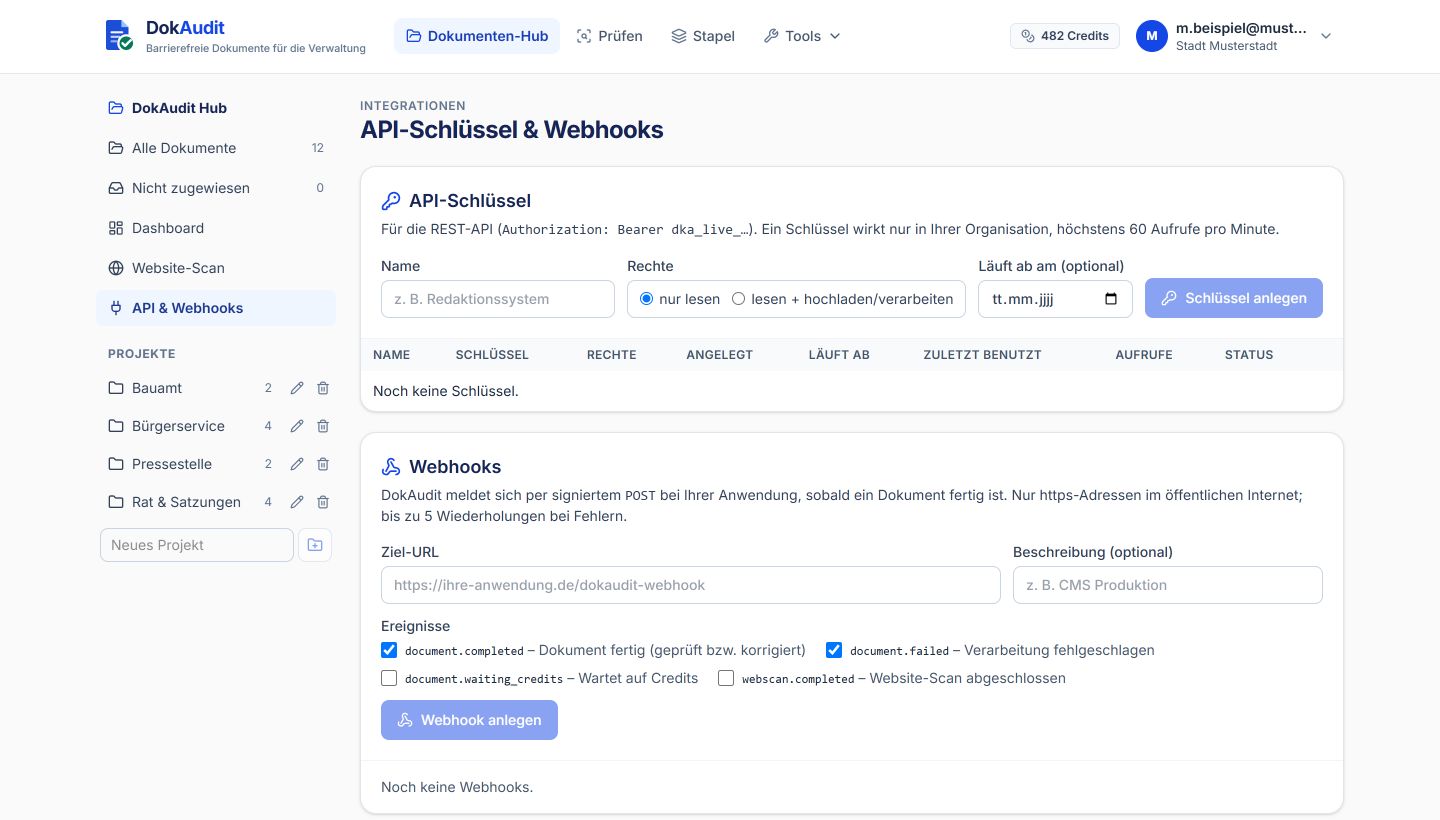
- Create a key: Administrators generate an API key with read or write permission in the hub under “Integrations”. It is shown only once; only a hash is stored.
- Hand over a document: A POST with the file is all it takes. You get a document ID immediately; processing runs in the background, fully automatically if you wish.
- Learn the result: Either by webhook (document.completed) or by querying the status. No constant polling needed.
- Collect the result: The corrected PDF, optionally the PDF/UA-2 version, and the test report as JSON or PDF – as evidence for your records.
Webhooks: your system knows straight away
DokAudit reports events by POST to your https address – signed, retried on errors and uniquely identifiable. Events: document.completed (finished, checked or corrected), document.failed, document.waiting_credits and webscan.completed.
- HMAC-SHA256 signature in the X-DokAudit-Signature header (format t=…,v1=…), sample code for Python and Node.js in the documentation
- Up to 5 automatic retries at increasing intervals (10 s, 1 min, 5 min, 30 min, 2 h)
- A unique event ID in the X-DokAudit-Delivery header, so duplicate deliveries can be detected reliably
- Delivery log and test call in the hub; targets in private networks are rejected for security reasons
Typical scenarios in public administration
- Content management system: Every PDF that editors upload is checked and corrected before publication. Result and report come back by webhook.
- Document management: Newly filed documents run through the check automatically; failed cases appear in the hub.
- Form servers and application portals: New form PDFs are checked for accessibility before they are made available and, where possible, corrected straight away.
- Council information systems: Meeting papers, resolutions and annexes are kept up to date continuously instead of catching up laboriously once a year.
- Clean-up via website scan: The API finds all the PDFs on a website, checks them free of charge and imports the relevant ones into the library.
- Continuous Accessibility: Websites are re-checked daily, weekly or monthly. New, changed and removed PDFs appear as a delta; optionally, new problem cases are transferred to the hub automatically.
- Nightly batches: A job hands over entire folders; webhooks report each finished document.
Ready-made plugins and on-premises
Live demos: TYPO3 · Drupal
- TYPO3 extension: Checks every PDF in the file list, replaces it in place – sys_file UID, links and content elements remain unchanged, the original is backed up.
- Drupal module: The same for the media library: fid, URI and media references stay, new uploads are queued automatically, sync via cron or Drush.
- On-premises: A Docker container without mandatory external dependencies (AI optional) for data centres and larger organisations.
Billing and operation
- The same credits as in the interface: 1 credit per 5 pages or part thereof per document, AI and any number of re-checks included. Website scan and quick check are free. If the balance is insufficient, the document automatically waits for credits.
- Clear limits: 60 calls per minute and key (then 429 with Retry-After); keys are valid only within your own organisation, read and write permissions are separate.
- Data centre in Germany or your own: Operated in Germany; on request as a Docker container in your infrastructure. The AI provider can be chosen, including Mistral (EU).
Questions
- Which languages are supported?
- Large parts of the web app are already available in English (language switch in the app); the document hub, the checker and the test report will follow shortly. The remediated PDFs, the API and the CMS plugins work for documents in any language – English, French, German, Italian and Spanish are detected automatically.
- Are the plugins open source?
- Yes, the TYPO3 extension and the Drupal module are licensed under the GPL.