Document Hub
All your documents in one place – accessible automatically.
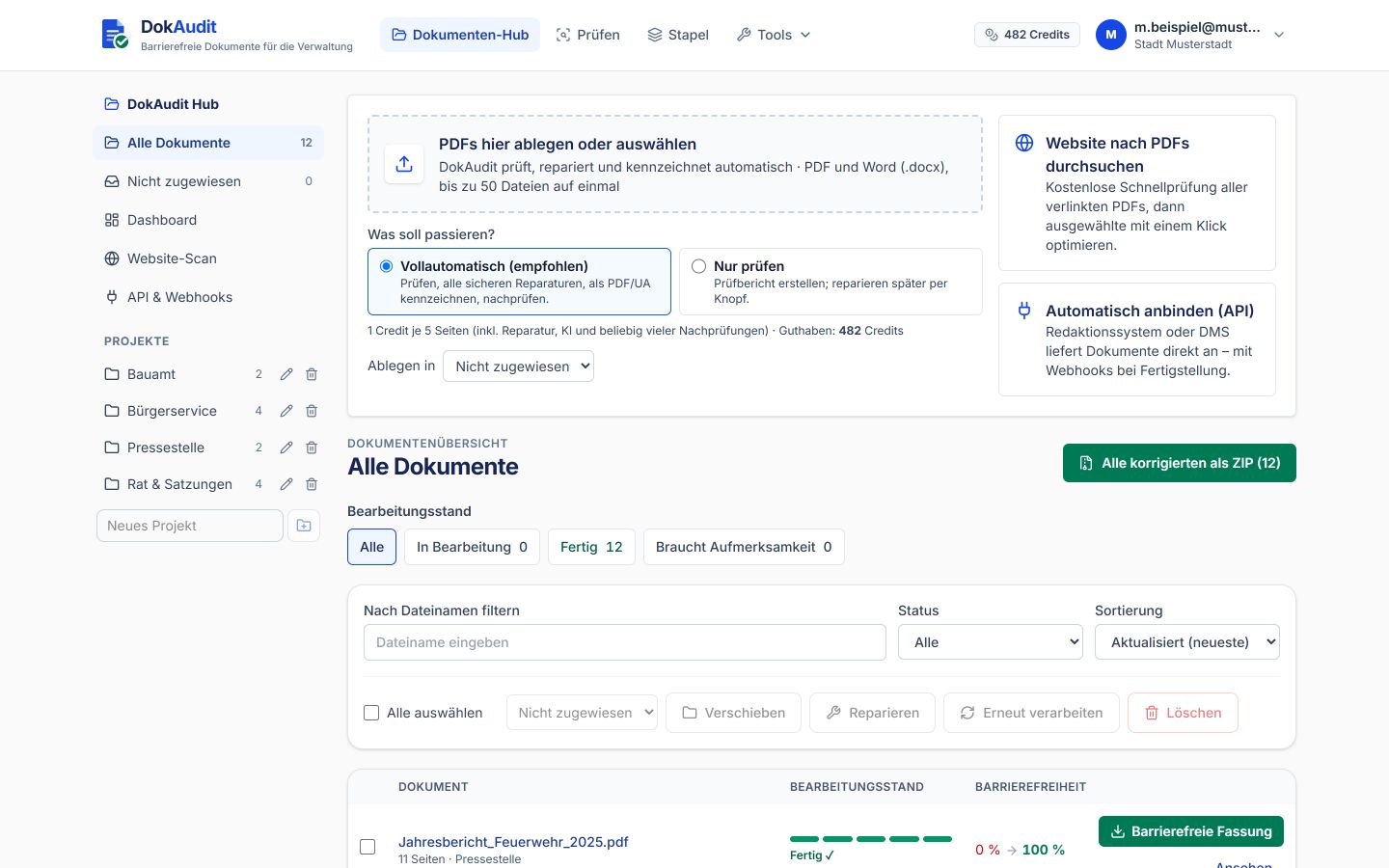
The Document Hub is the central workspace in DokAudit: you drop in PDFs or Word files, DokAudit checks them against PDF/UA-1, WCAG 2.2 and BITV 2.0 (Germany's federal accessibility ordinance for IT, based on EN 301 549), repairs everything that can be solved technically, tags the result and checks it again. For every document you see where it stands – and download the accessible version with its check report.
- PDF and Word (.docx)
- up to 50 files at once
- Check report as HTML and PDF
- Hosting in Germany
Start for free · Scan your website for free
What is the Document Hub?
The Document Hub is your organisation's library for accessible documents. Unlike a single check, where you upload a PDF and download the result straight away, documents in the Hub stay stored, are assigned to projects and are visible to your team – until you delete them or a retention period you have set expires.
The Hub is built for public administrations, universities, public companies and everyone who has to publish not one but dozens or hundreds of documents accessibly: bylaws, budgets, official gazettes, public notices, forms, minutes and brochures.

How the Hub works – in three steps
- Drop in: Drag PDFs or Word files into the Hub – up to 50 at once – and optionally assign them to a project such as “Building department” or “Council & bylaws”.
- Automatic processing: In full automation, DokAudit checks every document, applies all safe repairs, tags it as PDF/UA and checks the result again. Alternatively, check only and repair later at the click of a button.
- Download and publish: Accessible version, original and check report are available for each document – or all corrected files together as a ZIP.
Green means: done and accessible
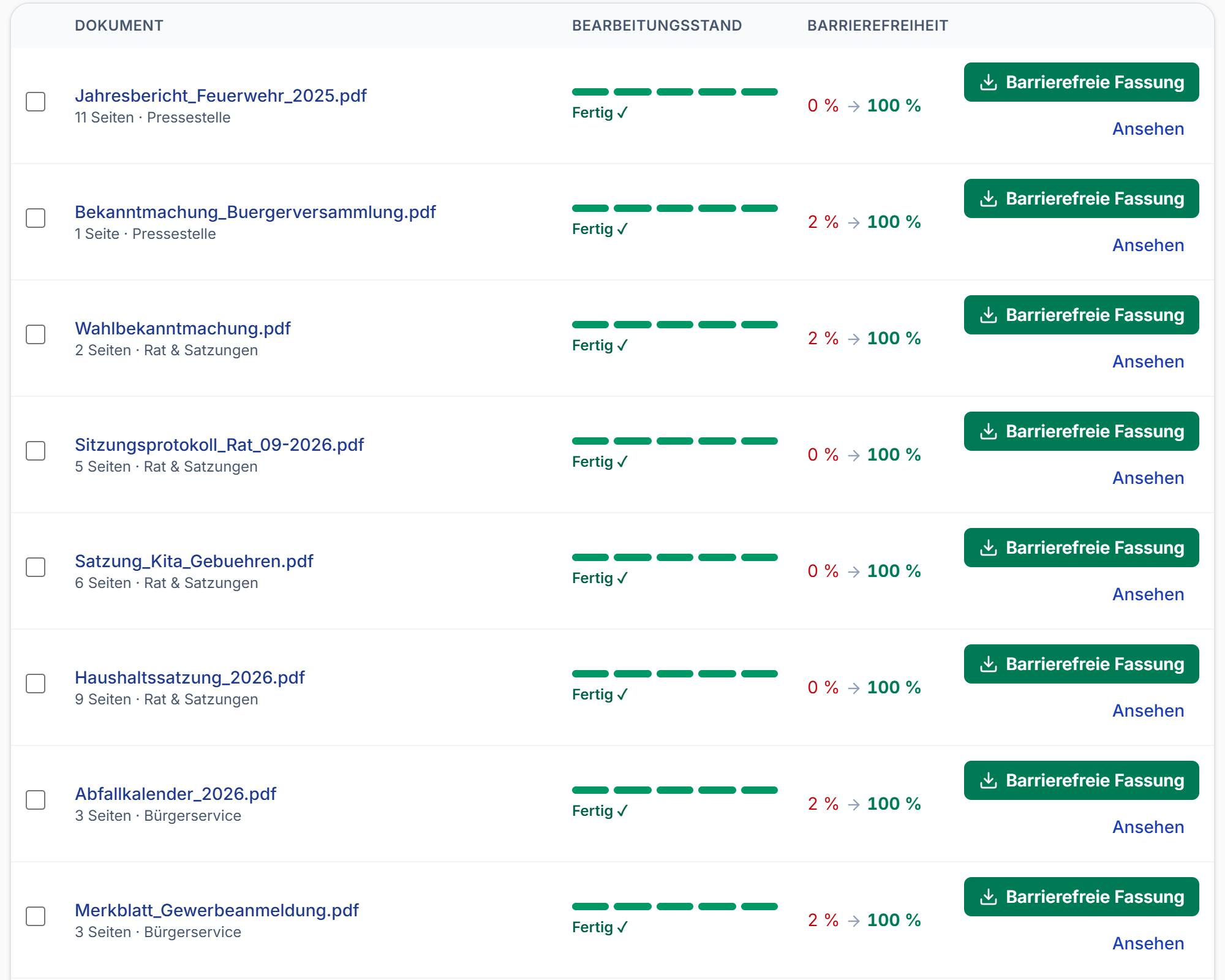
In the document overview you see the processing status of every document and its accessibility score before and after. Once a document is done, the accessible version is ready for download straight away.
Filter by “In progress”, “Done” or “Needs attention”, search by file name and work on several documents at once: move, repair, reprocess or delete.
- Processing status of every document at a glance
- Accessibility before → after in per cent
- Multiple selection for batch actions
- All corrected files as a ZIP
A traceable check report for every document
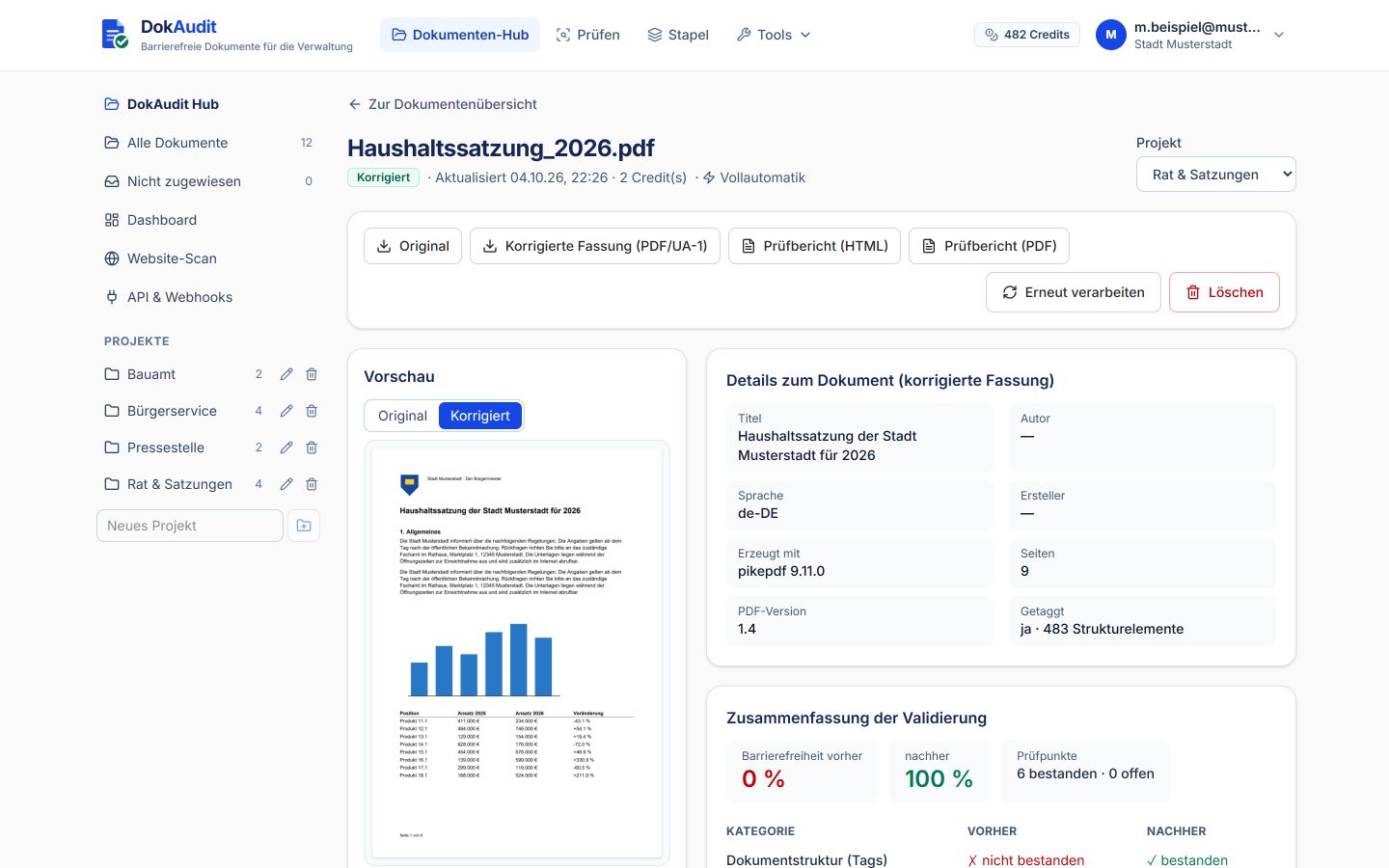
For each document, the Hub shows a preview of the original and the corrected version, the document properties such as title, language and structure elements, and a summary of the validation: accessibility before and after, passed and open checkpoints per category.
The check report is available as HTML and as PDF – for filing, as evidence for the monitoring body or as the basis for your accessibility statement.
- Original and corrected version (PDF/UA-1) to download
- Check report as HTML and PDF
- Before-and-after comparison per check category
- Reprocess when rules have improved
What DokAudit repairs automatically
The repairs follow PDF/UA-1 (ISO 14289-1) and the Matterhorn Protocol. After every repair, DokAudit checks again – with veraPDF and its own checks of the logical structure.
- Tags and reading order: Headings, paragraphs, lists and figures are tagged; the reading order follows the content, even in multi-column layouts.
- Tables: Header cells, table sections and associations so that screen readers announce rows and columns correctly.
- Forms: Form fields with understandable labels and tooltips – including comb fields such as the digits of an IBAN.
- Images and alt text: Decorative elements become artifacts; for figures, DokAudit suggests alt text, and photos with a caption get the caption as their description.
- Title, language, metadata: Document title, language, PDF/UA identifier and XMP metadata are set and harmonised.
- Fonts and characters: Missing Unicode mappings and glyph widths are added so that text can be read aloud and searched correctly.
- Links and bookmarks: References are tagged as links, tables of contents are linked and bookmarks are generated from the headings.
- Scanned documents: Scans get text recognition (OCR) and then structure – so that older archives become readable too.
- Colour contrast (optional): On request, DokAudit raises text contrast that is too weak; logos and brand names remain exempt, as WCAG allows.
What automation does not replace
Automated checking can only reliably assess part of the requirements. Whether an alt text correctly conveys the content of a chart, or whether a heading has been chosen sensibly, is ultimately judged by a human. That is why DokAudit shows honestly what was done automatically and what still needs an expert review.
Where a repair is not possible with certainty, DokAudit prefers to leave the document unchanged and marks it as “Needs attention”, rather than delivering a result that appears compliant but is actually worse.
Website scan and Continuous Accessibility
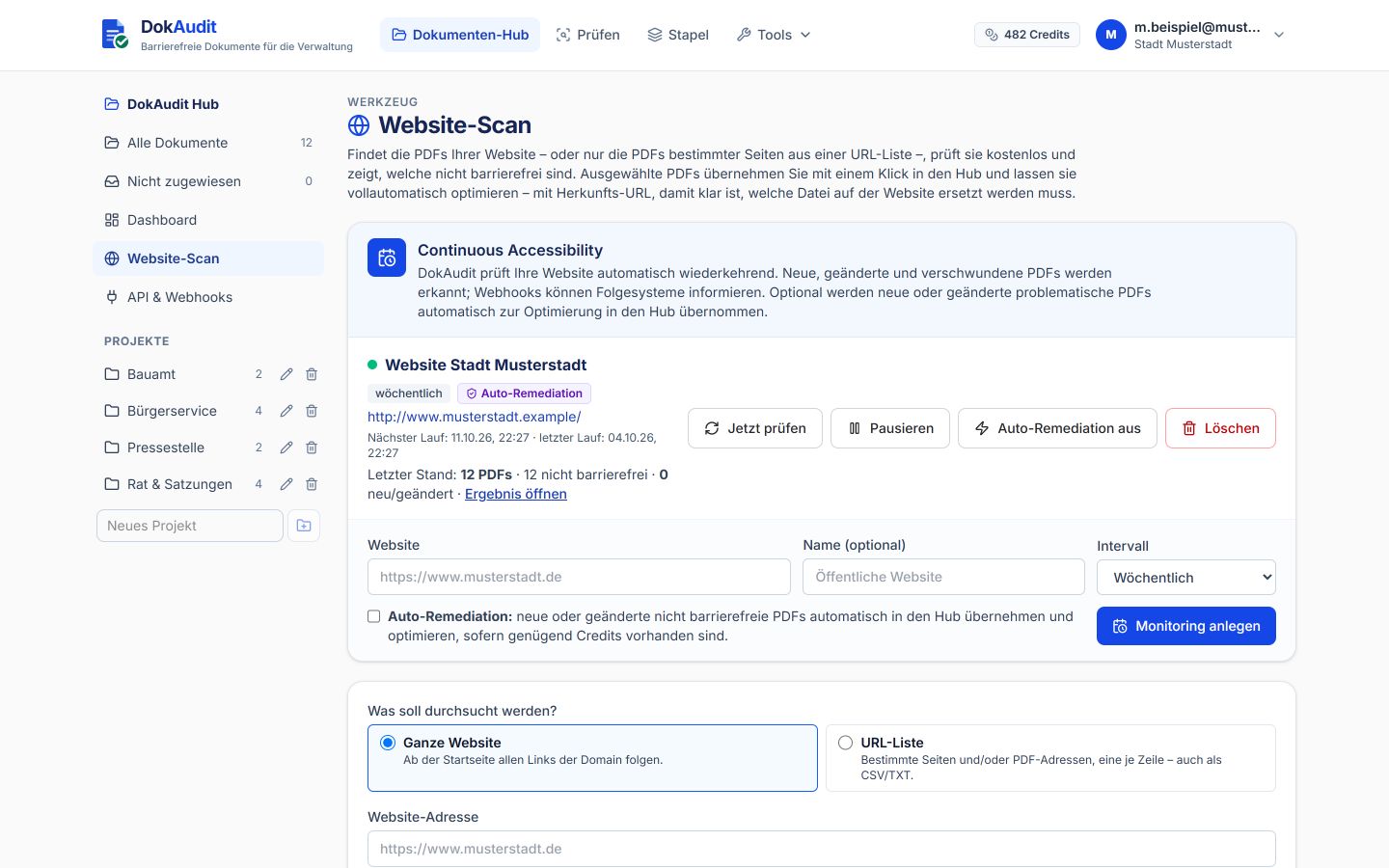
The website scan finds all PDFs on your website – or only the PDFs of specific pages from a URL list –, checks them free of charge and shows which ones are not accessible. You transfer selected PDFs into the Hub with one click, together with their source URL, so it is clear which file on the website needs replacing.
With Continuous Accessibility, DokAudit checks your website daily, weekly or monthly. New, changed and removed PDFs are detected; on request, auto-remediation transfers new problematic PDFs straight into the Hub and optimises them.
- Entire website or URL list (also CSV/TXT)
- Daily, weekly or monthly interval
- Auto-remediation optional
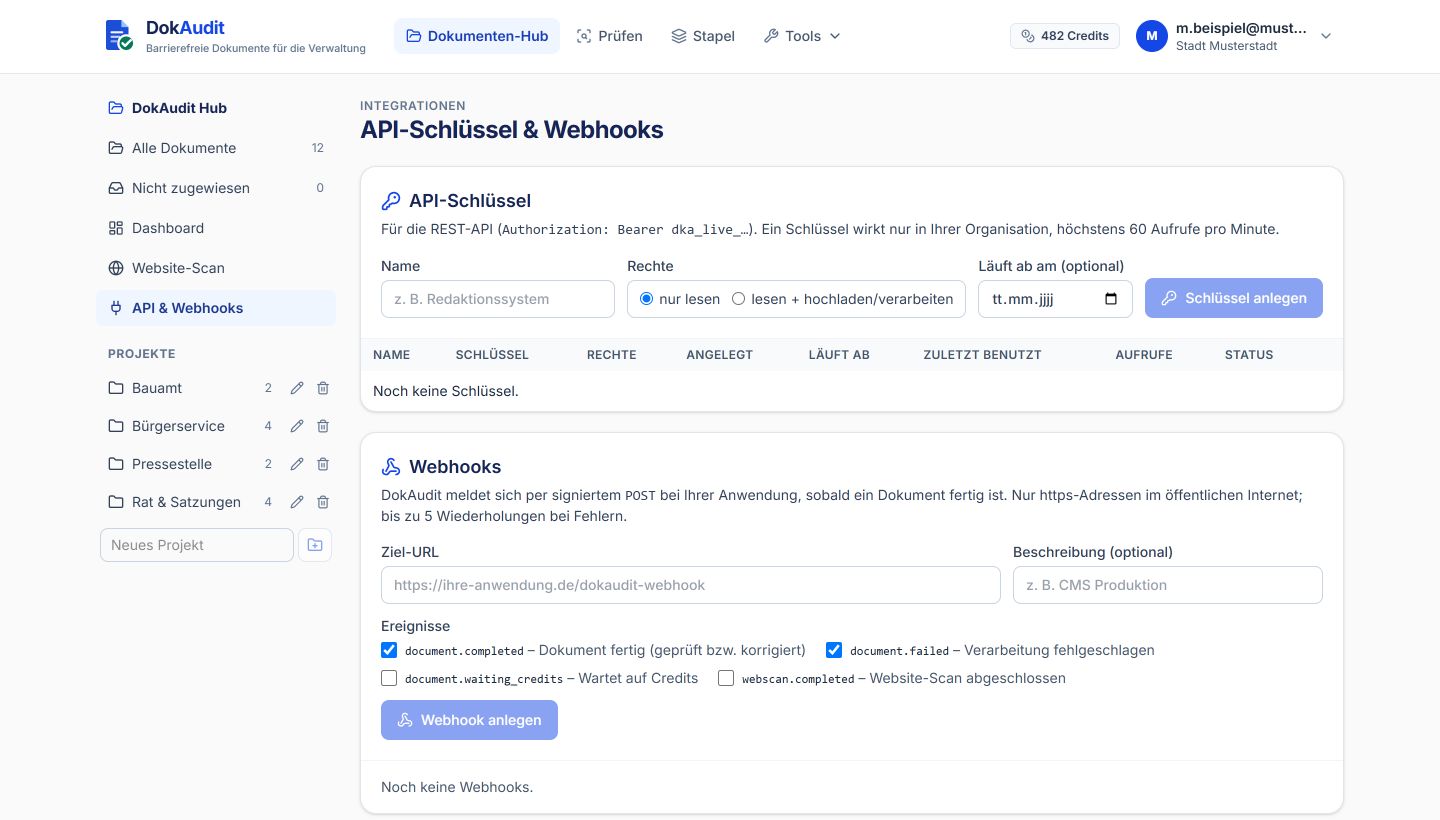
- Webhooks notify downstream systems
Made for teams and organisations
The Hub is built for organisations from the ground up: with departments, multiple users, clear permissions and connections to existing systems.
- Projects: Organise documents by department, topic or assignment; filter by processing status and state.
- Dashboard: Number of documents, accessibility before and after, credits used and available at a glance.
- Roles and sign-in: Several users per organisation, management by administrators, sign-in with a Microsoft account (SSO) too.
- Retention: Documents stay stored until you delete them – or you set an automatic deletion period in days.
- API, webhooks and MCP: Your content management system, DMS or specialist applications deliver documents straight to the Hub; AI agents use DokAudit via Remote MCP.
- Hosting in Germany: Operated in an ISO/IEC 27001-certified data centre in Germany, data processing agreement included; on-premises on request.
What does the Hub cost?
Billing is per page: 1 credit for every 5 pages or part thereof of a document – repair, AI support and any number of re-checks included. The website scan is free. You will find the current packages on the pricing page.
See pricing
Frequently asked questions about the Document Hub
- Which file formats can the Hub process?
- PDF and Word (.docx). Word files are converted to PDF and then checked and processed like any other PDF.
- What is the difference between full automation and “Check only”?
- Full automation checks, applies all safe repairs, tags the document as PDF/UA and checks it again. “Check only” initially just creates the check report; you can repair later at the click of a button.
- Which standards does DokAudit check against?
- PDF/UA-1 (ISO 14289-1) with the Matterhorn Protocol, WCAG 2.2 and BITV 2.0 or EN 301 549. Technical checks use veraPDF, among other tools, and DokAudit's own checks of the logical structure.
- Does DokAudit make every PDF 100 per cent accessible?
- No – and no one serious claims that. DokAudit does everything that can be solved reliably on a technical level and shows openly what needs a human expert review, such as whether the content of alt text is correct.
- Where are the documents stored?
- In an ISO/IEC 27001-certified data centre in Germany. You decide yourself how long documents are kept; a data processing agreement (under the GDPR) is included.
- Can I connect the Hub to our CMS or DMS?
- Yes. Via the REST API and webhooks, TYPO3, SharePoint, document management systems or specialist applications deliver documents straight to the Hub and automatically receive the accessible version back.
- What is the difference from the website scan?
- The website scan assesses the PDFs on a website free of charge. The Hub is the workspace in which documents are processed, stored and managed – you transfer PDFs found by the scan with one click.
Ready for your first batch?
Create an account, drag documents into the Hub and see what DokAudit makes of them. Or let us show you the Hub in a short online introduction.
Start for free · Book an online introduction